Export HTML Table to Excel with TableExport (No jQuery) — Copy-Ready Code
Programming › Export HTML Table to Excel with TableExport (No jQuery) — Copy-Ready Code
จากบทความที่แล้วที่แนะนำวิธีการ Import ข้อมูลจากไฟล์ Excel โดยใช้ library ของ phpoffice/phpspreadsheet ไปแล้วนั้น วันนี้เรามาดูวิธีการ Export ข้อมูลจากตารางที่ต้องการส่งออกเป็นไฟล์ excel กันครับ มาดูกันเลยว่ามีวิธีการทำอย่างไร
สำหรับคนที่ต้องการกลับไปดูวิธีการ import ข้อมูลจาก excel สามารถกดลิงค์นี้เพื่อเข้าไปอ่านได้เลยครับ วิธี Import ข้อมูลจาก Excel โดย PHP ใช้ phpoffice/phpspreadsheet
1. ติดตั้งไลบรารี
- สามารถ download ไฟล์จากเว็บไซต์ tableexport ได้เลยครับ tableExport
2. สร้างไฟล์ PHP
- สร้างไฟล์ php เพื่อทดลองส่งออกข้อมูลเป็นไฟล์ excel
- ประกาศ tag เพื่อเรียกใช้ตัว libray tableExport เพื่อเป็นฟังก์ชันในการทำงานต่อไป
3. เขียนตารางที่ต้องการ export เป็นข้อมูลในไฟล์ excel
- ในส่วนของตัว body เราจะสร้่างตารางที่ประกอบด้วยข้อมูลตัวอย่างลงไป
>First name/td> |
>Last name/td> |
>Sex/td> |
>Mobile/td> |
Mr. A |
AAA |
Male |
123456 |
Mr. B |
BBB |
Male |
78910 |
Mr. C |
CCC |
Female |
111213 |
Mr. D |
DDD |
Male |
141516 |
Mr. E |
EEE |
Female |
171819 |
4. การเรียกใช้งาน export excel
- เขียนปุ่มสำหรับกดเรียกใช้งานฟังก์ชั่น tableexport เพื่อส่งออกข้อมูลตารางที่เราต้องการ
แล้วนำโค้ดของทุกส่วนมารวมกันครับ
First name |
Last name |
Sex |
Mobile |
Mr. A |
AAA |
Male |
123456 |
Mr. B |
BBB |
Male |
78910 |
Mr. C |
CCC |
Female |
111213 |
Mr. D |
DDD |
Male |
141516 |
Mr. E |
EEE |
Female |
171819 |
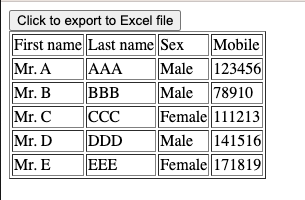
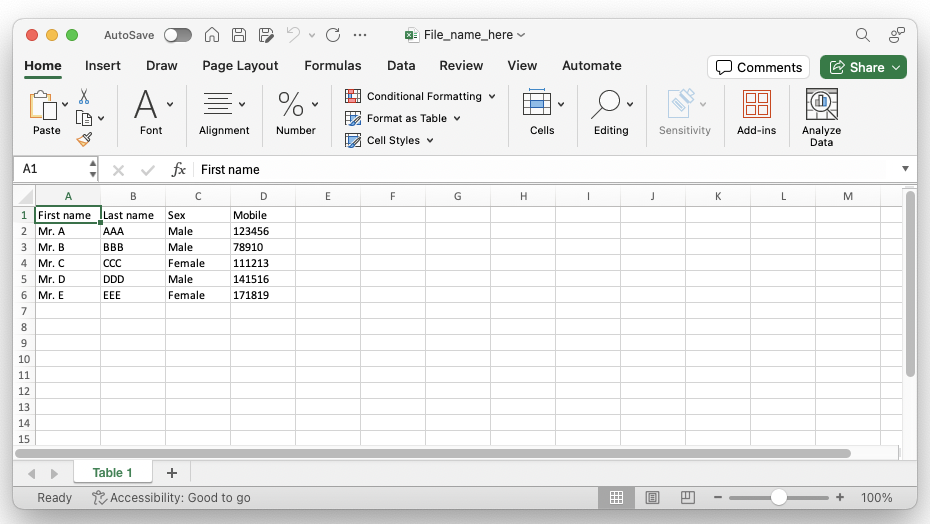
ผลลัพธ์ที่ได้จากหน้าจอ เมื่อกดปุ่ม export ก็จะสามารถส่งออกข้อมูลมาเป็นไฟล์ excel ได้แล้วง่ายๆ ลองนำวิธีนี้ไปใช้งานกันดูได้นะครับ และมีส่วนเสริมให้ใช้ปรับแต่งเพิ่มเติมได้ ลองไปศึกษาคู่มือในเว็บไซต์ของ tableExport กันได้เลย
Please rate your satisfaction with this article

Post a Comment
Your email address will not be displayed to others. Required fields are marked *
Recommended Content