What Is robots.txt? How to Write It with Easy Examples
Technology › What Is robots.txt? How to Write It with Easy Examples
06 Aug 2024 21:15

ไฟล์ robots.txt เป็นเหมือนป้ายบอกทางสำหรับบอทของเครื่องมือค้นหาอย่าง Google ว่าส่วนไหนของเว็บไซต์ที่สามารถเข้ามาดึงข้อมูล (crawl) ได้ และส่วนไหนที่ไม่ควรเข้ามา โดยไฟล์นี้จะวางไว้ที่ root directory ของเว็บไซต์ เช่น www.example.com/robots.txt [URL ที่ไม่ถูกต้องถูกนำออกแล้ว]
ทำไมต้องมีไฟล์ robots.txt?
- ควบคุมการเข้าถึงของบอท: ป้องกันไม่ให้บอทเข้าไปดึงข้อมูลส่วนที่ไม่ต้องการ เช่น หน้า login, หน้า preview หรือไฟล์ที่ซ้ำกัน
- เพิ่มประสิทธิภาพการค้นหา: ช่วยให้บอทโฟกัสไปที่เนื้อหาสำคัญ ทำให้ผลการค้นหาของเว็บไซต์ดีขึ้น
- ป้องกันการคัดลอกเนื้อหา: ช่วยป้องกันไม่ให้เว็บไซต์อื่นๆ คัดลอกเนื้อหาของเราไป

วิธีการเขียนไฟล์ robots.txt
ไฟล์ robots.txt เป็นไฟล์ข้อความธรรมดา ใช้ภาษาอังกฤษ และมีโครงสร้างที่ค่อนข้างง่าย โดยมีคำสั่งหลักๆ ดังนี้
- User-agent: ระบุบอทที่เราต้องการควบคุม เช่น Googlebot, Bingbot
- Disallow: บล็อกไม่ให้บอทเข้าถึง URL ที่ระบุ
- Allow: อนุญาตให้บอทเข้าถึง URL ที่ระบุ
- Sitemap: ระบุตำแหน่งของไฟล์ sitemap.xml
ตัวของอย่างไฟล์ robots.txt
 User-agent: *
 Disallow: /admin/
 Disallow: /images/
 Allow: /images/products/
 Sitemap: https://www.example.com/sitemap.xml
อธิบายความหมายของโค้ดแต่ละบรรทัดกัน
-
บอททุกตัว (User-agent: *)
- ห้ามเข้าถึงโฟลเดอร์ admin ทั้งหมด (Disallow: /admin/)
- ห้ามเข้าถึงโฟลเดอร์ images ทั้งหมด (Disallow: /images/)
- อนุญาตให้เข้าถึงโฟลเดอร์ images/products/ (Allow: /images/products/)
- ไฟล์ sitemap อยู่ที่ https://www.example.com/sitemap.xml
สิ่งที่ควรทราบเพิ่มเติมในการสร้างไฟล์ robots.txt
- ไฟล์ robots.txt ไม่ได้เป็นกฎที่เข้มงวด: แม้ว่าเราจะใช้คำสั่ง Disallow แต่บอทบางตัวอาจจะยังเข้ามาได้
- ไฟล์ robots.txt ไม่สามารถป้องกันการคัดลอกเนื้อหาได้ 100%: มีวิธีการอื่นๆ ที่สามารถใช้ในการป้องกันการคัดลอกเนื้อหาได้
- การเปลี่ยนแปลงไฟล์ robots.txt อาจใช้เวลาในการปรับ: Google อาจใช้เวลาในการอัปเดตข้อมูลตามไฟล์ robots.txt ที่เราเปลี่ยนแปลง
- มีเครื่องมือช่วยสร้างไฟล์ robots.txt: มีเครื่องมือออนไลน์มากมายที่ช่วยให้เราสร้างไฟล์ robots.txt ได้ง่ายขึ้น
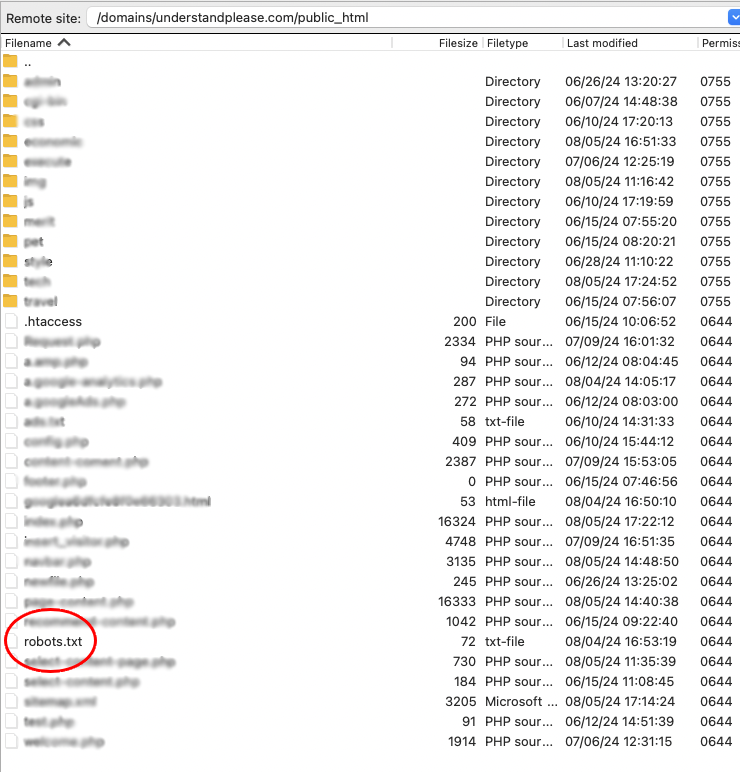
ไฟล์ robots.txt เป็นเครื่องมือที่สำคัญสำหรับผู้ที่ต้องการควบคุมการเข้าถึงเว็บไซต์ของตนเอง การเขียนไฟล์ robots.txt ที่ถูกต้องจะช่วยให้เราสามารถเพิ่มประสิทธิภาพการค้นหาและปกป้องเนื้อหาของเราได้
- ศึกษาคู่มืออย่างละเอียด: ก่อนที่จะเขียนไฟล์ robots.txt ควรศึกษาคู่มืออย่างละเอียดจาก Google Search Central
- ทดสอบไฟล์ robots.txt: หลังจากเขียนไฟล์ robots.txt เสร็จแล้ว ควรทดสอบดูว่าบอทเข้าถึงเว็บไซต์ของเราตามที่เราต้องการหรือไม่
- อัปเดตไฟล์ robots.txt เป็นประจำ: เมื่อมีการเปลี่ยนแปลงโครงสร้างของเว็บไซต์ ควรอัปเดตไฟล์ robots.txt ให้ทันสมัย
Please rate your satisfaction with this article

Post a Comment
Your email address will not be displayed to others. Required fields are marked *
Recommended Content

In an era where “wireless earbuds” have become an essential accessory for smartphone users — for watching movies, liste…
Read more

In an era where everything is connected to the internet, having fast and stable home Wi-Fi is essential. Slow connectio…
Read more

Therefore, when choosing the best VPN for 2026, consider your own needs first: If you want the most all-round VPN (spee…
Read more

The year 2026 marks a major turning point for work laptops with the arrival of high-performance processors designed spe…
Read more

Logitech has returned once again with a major upgrade to its beloved MX Master series, a favorite among professionals a…
Read more

วันนี้เราจะมาดูวิธีการตั้งอีเมล์ officail กันครับ ว่าจะมีขั้นตอนการอย่าไรบ้าง เบื้องต้นเรามารู้จัก google workspace กัน…
Read more

Onsen Mon Jam is located in Mae Rim District, Chiang Mai Province. Inspired by Japanese onsen, it is nestled in nature …
Read more

Onsen Mon Jam is located in Mae Rim District, Chiang Mai Province. Inspired by Japanese onsen, it is nestled in nature …
Read more
Google Search Console is a free tool provided by Google designed to help website owners and SEO specialists monitor and…
Read more

Google Analytics is a powerful tool for tracking and analyzing user behavior on websites and applications. It provides …
Read more
If your Google Business Mail or Google Workspace (formerly G Suite) is not receiving messages or emails, it could be du…
Read more

HTML (HyperText Markup Language) is a markup language used to create and format documents on the web. It forms the fund…
Read more