Fix Google Workspace (Business Mail) Not Receiving Emails – Step-by-Step Guide
Technology › Fix Google Workspace (Business Mail) Not Receiving Emails – Step-by-Step Guide
04 Aug 2024 05:00
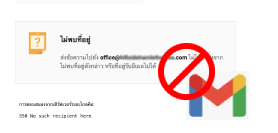
หาก Google Business Mail หรือ Google Workspace (เดิมคือ G Suite) ของคุณไม่สามารถรับข้อความหรืออีเมลได้ อาจเกิดจากหลายสาเหตุ นี่คือขั้นตอนการตรวจสอบและแก้ไขเบื้องต้น
1. ตรวจสอบการตั้งค่าการรับอีเมล
- ตรวจสอบว่ามีการตั้งค่าตัวกรองอีเมลที่อาจจะบล็อกอีเมลเข้ามาหรือไม่
- ตรวจสอบโฟลเดอร์สแปม (Spam) และโฟลเดอร์ขยะ (Trash) ว่าอีเมลถูกส่งเข้าไปที่นั่นหรือไม่
2. ตรวจสอบการตั้งค่า MX Records
- การตั้งค่า MX Records เป็นสิ่งสำคัญในการรับอีเมล ตรวจสอบว่า MX Records ถูกตั้งค่าอย่างถูกต้องโดยใช้ Google Admin Console
- คุณสามารถใช้เครื่องมือออนไลน์เช่น MX Toolbox เพื่อทดสอบการตั้งค่า MX Records ของโดเมนคุณ
3. ตรวจสอบการตั้งค่าความปลอดภัย
- ตรวจสอบว่ามีการตั้งค่าตัวกรองอีเมลที่อาจจะบล็อกอีเมลเข้ามาหรือไม่
- ตรวจสอบโฟลเดอร์สแปม (Spam) และโฟลเดอร์ขยะ (Trash) ว่าอีเมลถูกส่งเข้าไปที่นั่นหรือไม่
3. ตรวจสอบการตั้งค่าความปลอดภัย
- ตรวจสอบว่าคุณมีการตั้งค่าการรับรองความถูกต้องของอีเมล เช่น SPF, DKIM, และ DMARC ที่ถูกต้องหรือไม่ เพื่อป้องกันไม่ให้ระบบป้องกันสแปมปฏิเสธอีเมลของคุณ
4. ตรวจสอบโควต้าของกล่องจดหมาย
- ตรวจสอบว่าโควต้าพื้นที่จัดเก็บข้อมูลของบัญชีอีเมลไม่เต็ม ถ้าเต็มคุณอาจต้องลบอีเมลเก่า ๆ หรือเพิ่มพื้นที่เก็บข้อมูล
5. ตรวจสอบกับผู้ให้บริการอินเทอร์เน็ต
- บางครั้งปัญหาอาจเกิดจากการบล็อกจากผู้ให้บริการอินเทอร์เน็ต (ISP) คุณอาจต้องติดต่อผู้ให้บริการเพื่อตรวจสอบว่ามีการบล็อกการเชื่อมต่อกับ Google หรือไม่
6. ตรวจสอบปัญหาที่รู้จักใน Google Workspace Status Dashboard
- Google มีหน้าสถานะ (Google Workspace Status Dashboard) ที่แสดงสถานะปัจจุบันของบริการต่าง ๆ ของ Google ซึ่งสามารถตรวจสอบได้ว่ามีปัญหากับบริการของ Google เองหรือไม่
7. ติดต่อฝ่ายสนับสนุนของ Google
- หากปัญหายังคงอยู่หลังจากทำตามขั้นตอนข้างต้น คุณสามารถติดต่อฝ่ายสนับสนุนของ Google Workspace เพื่อขอความช่วยเหลือเพิ่มเติม
วันนี้ผมเลยมาบอกวิธีที่ได้ผลคือ แจ้งให้ผู้ดูแลเว็บไซต์ของคุณเพิ่ม MX record เข้าไป โดยให้เขาไปที่ control Panel แล้วทำตามดังนี้ครับ
เข้าไปที่ MX Records
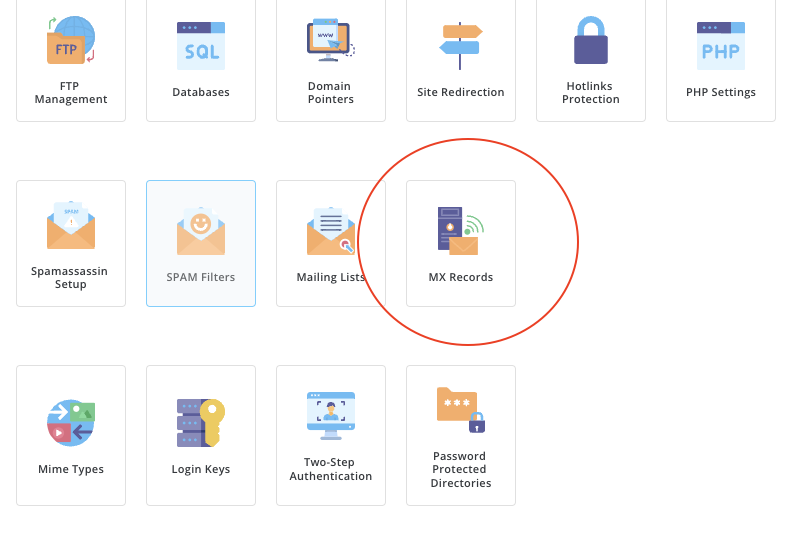
เพิ่มบริการของ Google เข้าไปครับ เท่านี้เมล์ของคุณก็จะสามารถรับข้อความอีเมล์ได้ตามปกติแล้ว

Please rate your satisfaction with this article

Post a Comment
Your email address will not be displayed to others. Required fields are marked *
Recommended Content

In an era where “wireless earbuds” have become an essential accessory for smartphone users — for watching movies, liste…
Read more

In an era where everything is connected to the internet, having fast and stable home Wi-Fi is essential. Slow connectio…
Read more

Therefore, when choosing the best VPN for 2026, consider your own needs first: If you want the most all-round VPN (spee…
Read more

The year 2026 marks a major turning point for work laptops with the arrival of high-performance processors designed spe…
Read more

Logitech has returned once again with a major upgrade to its beloved MX Master series, a favorite among professionals a…
Read more

วันนี้เราจะมาดูวิธีการตั้งอีเมล์ officail กันครับ ว่าจะมีขั้นตอนการอย่าไรบ้าง เบื้องต้นเรามารู้จัก google workspace กัน…
Read more

Onsen Mon Jam is located in Mae Rim District, Chiang Mai Province. Inspired by Japanese onsen, it is nestled in nature …
Read more

Onsen Mon Jam is located in Mae Rim District, Chiang Mai Province. Inspired by Japanese onsen, it is nestled in nature …
Read more
Google Search Console is a free tool provided by Google designed to help website owners and SEO specialists monitor and…
Read more

A robots.txt file is like a signpost for search engine bots like Google, telling them which parts of your website they …
Read more

Google Analytics is a powerful tool for tracking and analyzing user behavior on websites and applications. It provides …
Read more

HTML (HyperText Markup Language) is a markup language used to create and format documents on the web. It forms the fund…
Read more